Import your bank file. Watch it budget itself.
Download your transactions from CommBank, NAB, Westpac, ANZ or your bank, drop them in, and every one is sorted for you: Woolies, Ampol, Linkt, rego, rent, the lot. See what you earned, spent, saved and have left, across all your accounts.
- A$29 once · no subscription
- 30-day money-back
- No bank login
- Google Sheets + Excel
- CommBank
- NAB
- Westpac
- ANZ
- Macquarie
- Up
- Bankwest
- St.George
- Suncorp
- Wise
Most budgets die at the same step: typing in every transaction.
Apps want your bank login and a monthly fee. Templates want you to type. And if your money moves between a few accounts, both get it wrong: a transfer to the offset looks like spending, and payday looks like you're rich.
Sorted Budget skips the typing and understands transfers. You bring the bank files; it does the sorting.
About 10 minutes the first time. Two minutes after that.
- Download your transactions
From internet banking, as a CSV file. Our bank guides show exactly where the button is.
- Import them
File › Import, choose Replace current sheet. One account per Bank tab. Pick your bank and what the account is: household, rental property or side hustle.
- Check the few it doesn't know
Anything new shows in red. Pick a category once and it remembers, now and every month after.
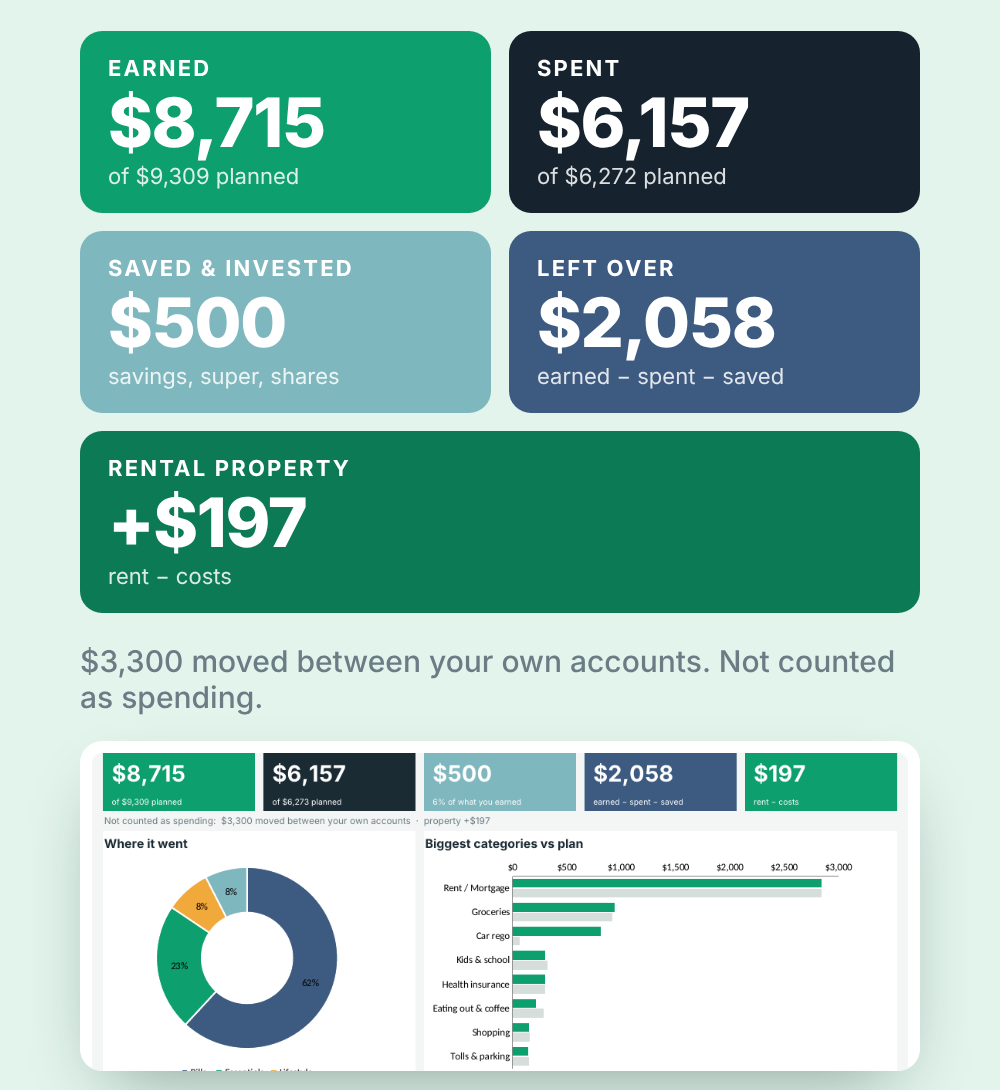
Earned. Spent. Saved. Left over.
For this month, last month, the last 3 months or the financial year. Across every account, with money you moved between them left out.
- Spending by category, against your plan
- Bills due in the next 14 days, and what to set aside each pay
- Weekly, fortnightly or monthly pay. Quarterly power and yearly rego smoothed out.
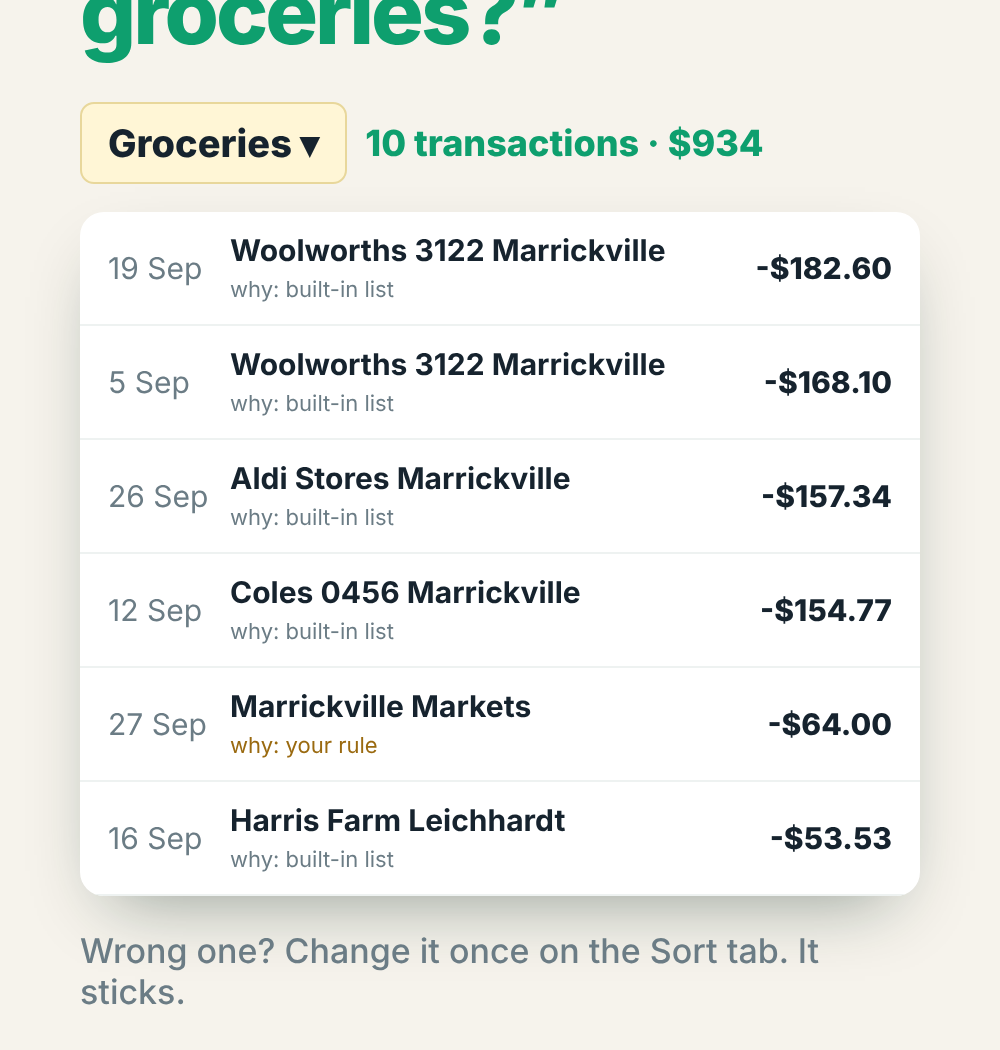
“How much did we spend on groceries?”
Pick any category and see every transaction behind the total, and why it landed there. Wrong one? Change it once and it sticks.
It already knows how Aussie money works
550+ Aussie merchants
Woolies, Coles, Aldi, Ampol, Linkt, Opal, Myki, Telstra, AGL, Medibank, Afterpay, council rates, Service NSW rego and hundreds more, sorted the moment you import.
Fortnightly pay, done right
Every bill converted to what to put aside each pay. Not the US “biweekly” guesswork.
Offset & multiple accounts
Salary account, offset, joint, savings: transfers between them cancel out automatically.
Rental property, ATO-style
Rent, interest, strata, agent fees, insurance and repairs for the financial year, grouped the way the ATO rental schedule asks. Landlord costs paid from your offset count too.
1 July – 30 June
Mark a category as tax-deductible and get financial-year totals plus a receipt checklist for tax time.
Side hustle kept separate
Money in and costs for your side business, out of the household budget and totalled for the year.
Your own AI money coach
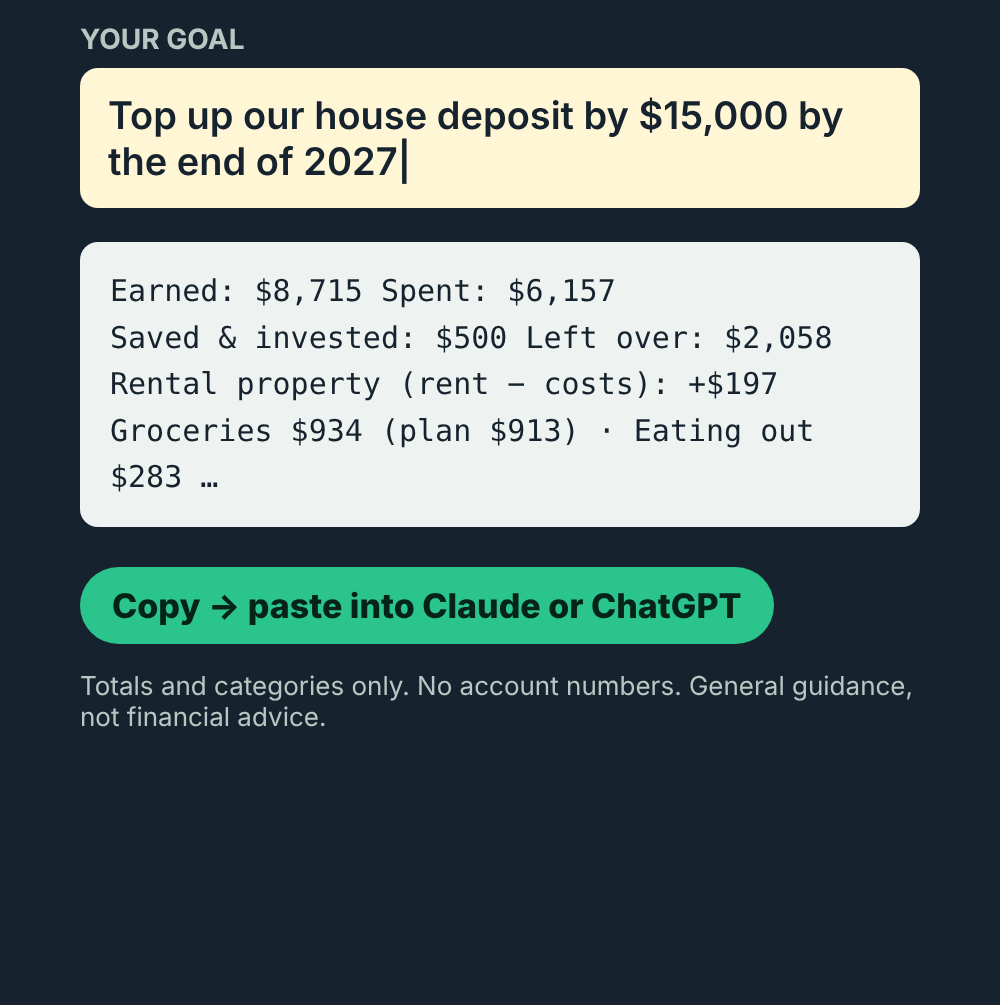
Type your goal (“top up the house deposit by $15,000 by 2027”). The sheet writes a privacy-safe summary of your month. Paste it into Claude or ChatGPT for a plain-English review and a 12-month plan.
Totals and categories only, never account numbers. General guidance, not financial advice.
The good bits of an app, without the login or the subscription
| Blank template | Budgeting app | Sorted Budget | |
|---|---|---|---|
| Getting transactions in | Type each one | Automatic | Import a file, sorted for you |
| Bank login needed | No | Yes | No |
| Transfers between your accounts | Counted as spending | Varies | Matched and left out |
| Fortnightly pay, AU tax year | Rarely | Varies | Built in |
| Rental property + side hustle | No | Rarely | Separate results |
| Your data | Yours | On their servers | In your own sheet |
| Cost | Once | Often monthly | A$29 once |
“I'm paid into one account, bills come out of the offset, there's a rental property, a joint account and a side hustle. Every budget I tried counted my own transfers as spending and told me nothing. So I built one that sorts it all out, and now it takes me two minutes each payday.”
Andy, Melbourne · maker of Sorted Budget
Sorted Budget, Australian edition
A$29 once · yours to keep
Get instant access30-day money-back guarantee. If it can't read your bank's file, or it's just not for you, email us and you'll get a refund.
- Google Sheets version (make your own copy in one click)
- Excel version (works offline)
- Up to 4 accounts + cash, transfers matched
- Plan, bills, goals, look inside any category
- Rental property + side hustle results
- Tax time, debt payoff, net worth
- Ask AI money-coach tab
- Free updates
Questions
Do I have to give it my bank login?
No. You download a file from your internet banking (it takes a minute; we have step-by-step guides for each bank) and import it. Nothing connects to your bank, and your numbers stay in your own spreadsheet. We never see them.
Which banks work?
Any bank that lets you download transactions as a CSV file. We've tested files from CommBank, NAB, Westpac, ANZ, Macquarie, Up, Bankwest, St.George, Suncorp and Wise. If yours doesn't read properly, email us and we'll fix it or refund you.
I'm not a spreadsheet person. Will I cope?
If you can download a file and pick from a dropdown, yes. The Home tab tells you the next step (there are three), and everything you can change is in yellow. No formulas to write.
Google Sheets or Excel?
Both are included. Google Sheets works on any computer (and on your phone for checking). Excel works offline on Windows or Mac (Excel 2019 or newer, or Microsoft 365).
We have several accounts. Does that work?
Yes, that's what it's built for. Up to 4 bank accounts or cards, plus cash. Transfers between your own accounts are matched and cancel out, so nothing is counted twice.
I have an investment property / a side hustle.
Mark that account as Rental property or Side hustle. Its money stays out of your household budget and you get its own result: rent in, costs out, grouped like the ATO rental schedule for tax time.
What does the Ask AI tab do?
It writes a summary of your month (totals and categories only, no account numbers or names) plus your goal. Copy it into Claude or ChatGPT and you get a plain-English review and a 12-month plan. It's general guidance, not financial advice.
Is it a subscription?
No. A$29 once, yours to keep, with free updates.
What if it's not for me?
Email us within 30 days and you'll get your money back. No forms, no fuss.
Is this financial advice?
No. It's a tool for seeing your own money clearly. For advice about your situation, talk to a licensed financial adviser.
Know where your money goes. This payday.
A$29 once. 30-day money-back. No bank login.
Get Sorted Budget