Your guest list, wired to your budget.
Type your budget and guest count and every line is priced for you. Then RSVPs, deposits and table numbers update your totals, monthly pay plan and seating chart by themselves.
Five steps. Most of it fills itself in.
Shown with a fictional couple. You only ever type in the yellow cells.
- 1
Type your budget and guest count
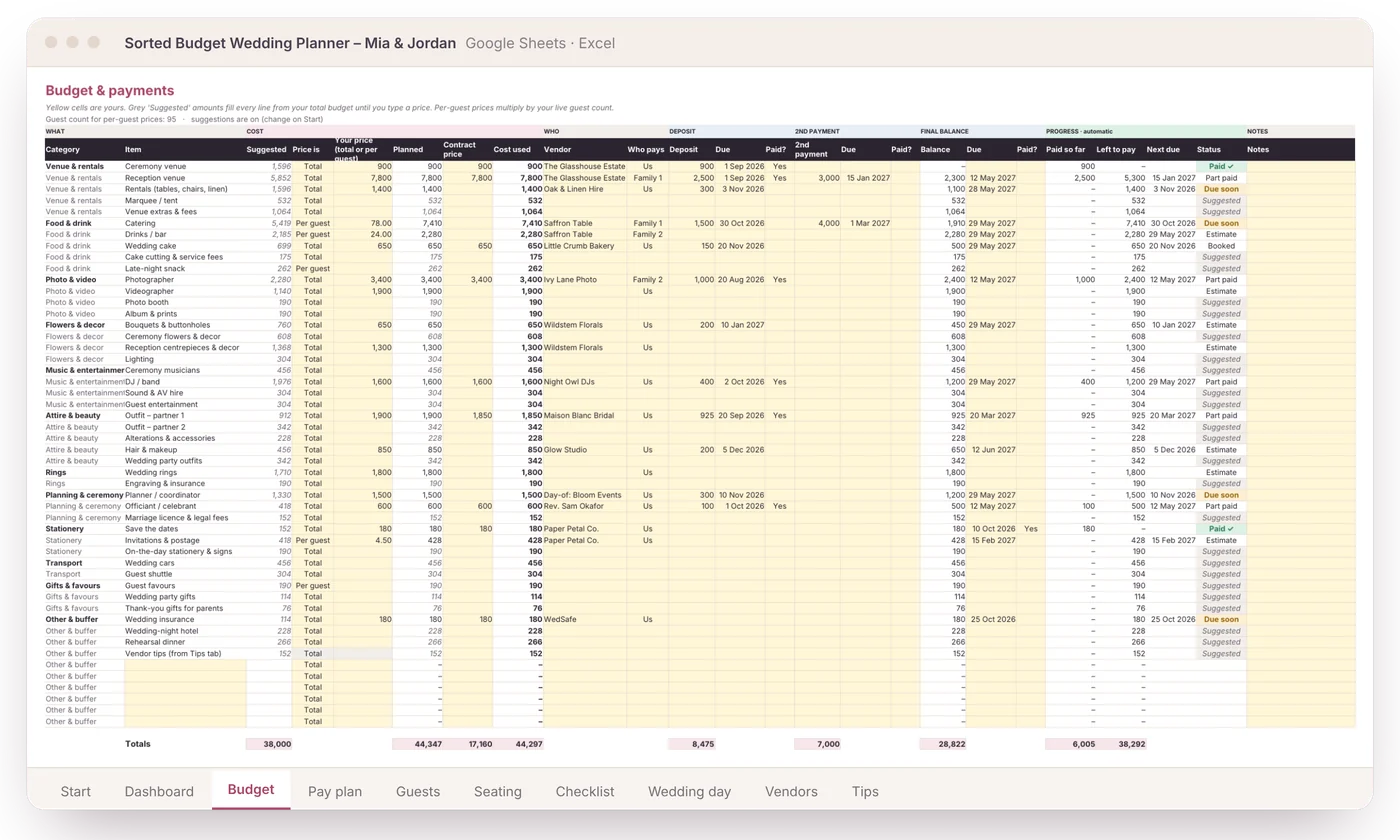
Every line on the Budget tab gets a suggested amount from a typical wedding split. No quotes yet? You still have a full plan on day one.
You type: 2 numbers · It does: 50 budget lines priced
- 2
Add guests and RSVPs
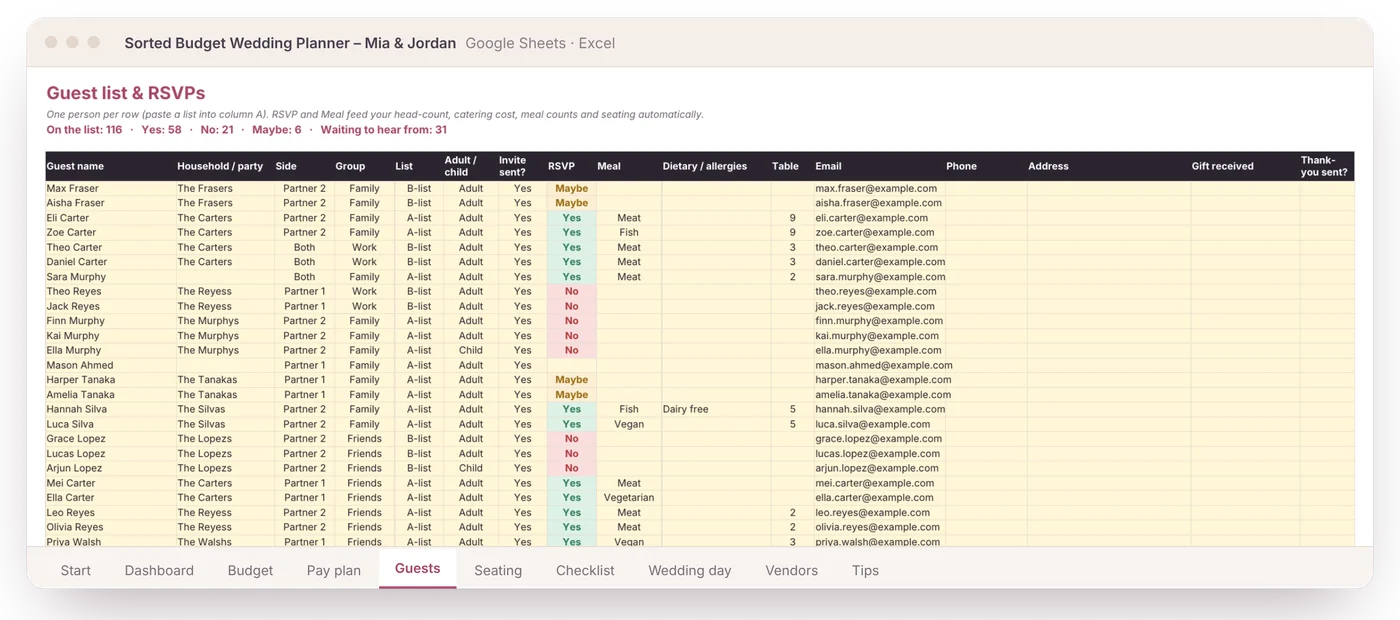
Mark catering and drinks as “per guest” and they multiply by your live head-count. Three people say no and the total drops by itself. Tag a B-list to see what it costs before invitations go out.
You type: Yes / No · It does: head-count, catering, bar, total, B-list savings
- 3
Add deposits and due dates
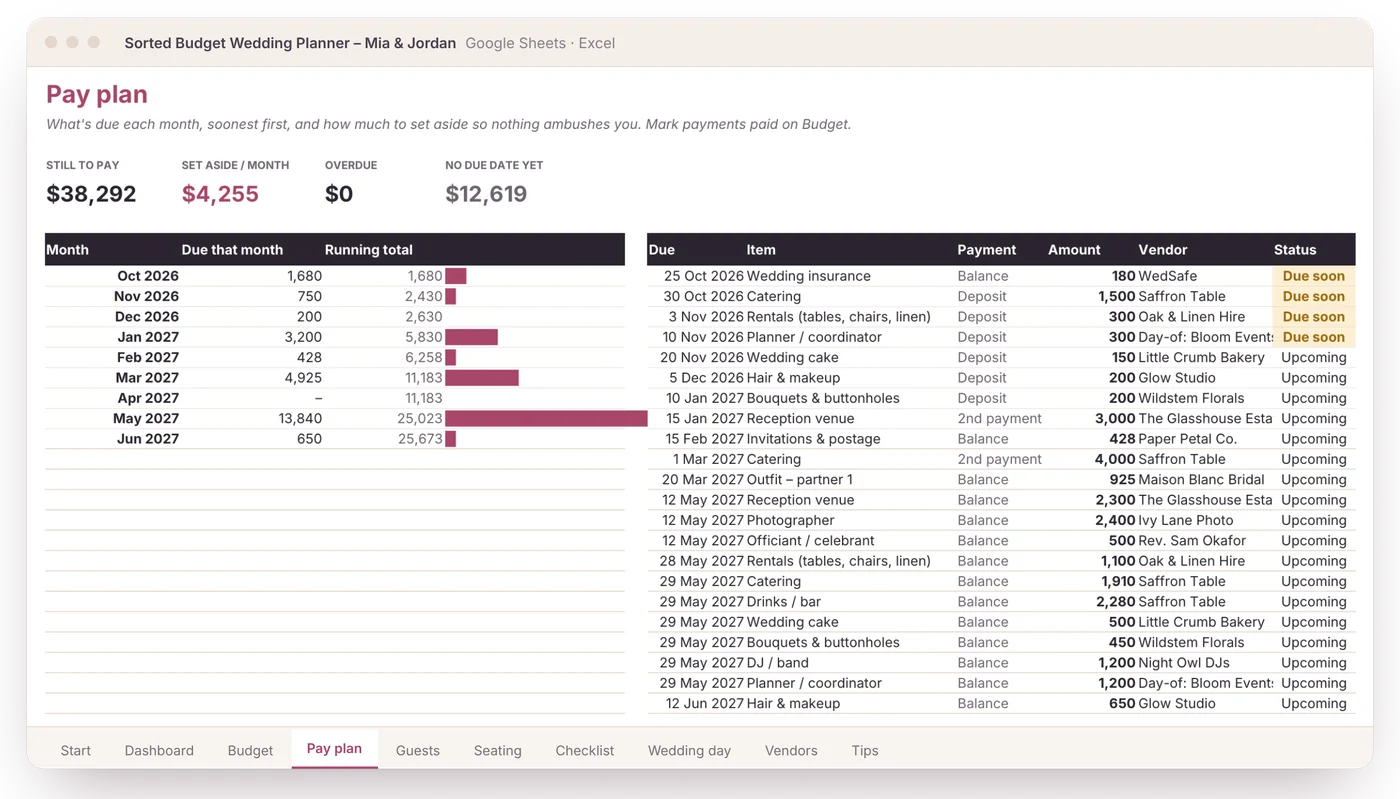
As you book, add each deposit, second payment and balance. The Pay plan lists them by month, flags what’s due soon and tells you how much to set aside each month.
You type: amounts and dates · It does: a month-by-month pay plan and a set-aside figure
- 4
Type a table number
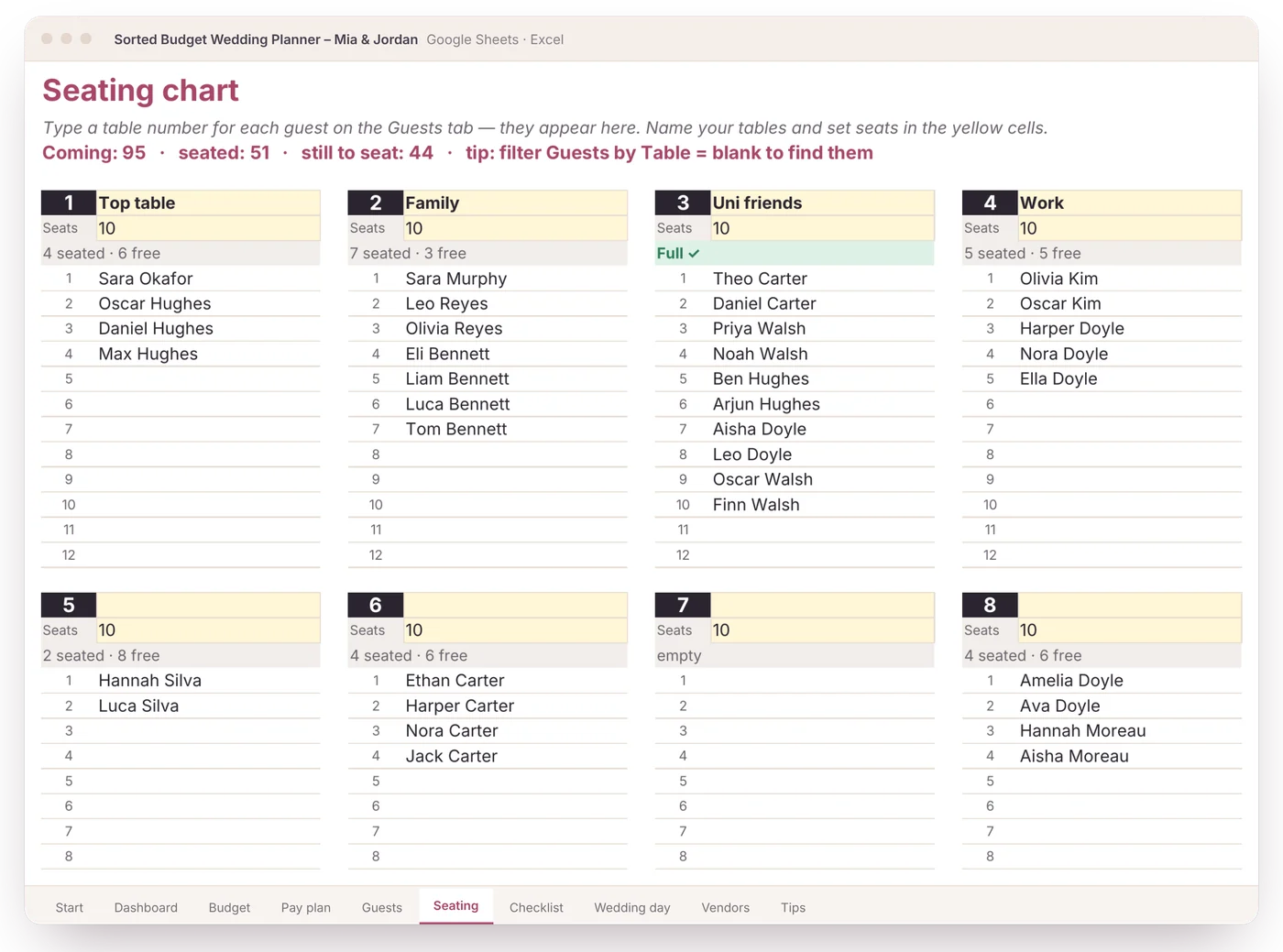
Give each guest a table on the guest list. The seating chart builds itself and shows who sits where, free seats and who still needs a seat.
You type: a number per guest · It does: the whole seating chart
- 5
Open the Dashboard
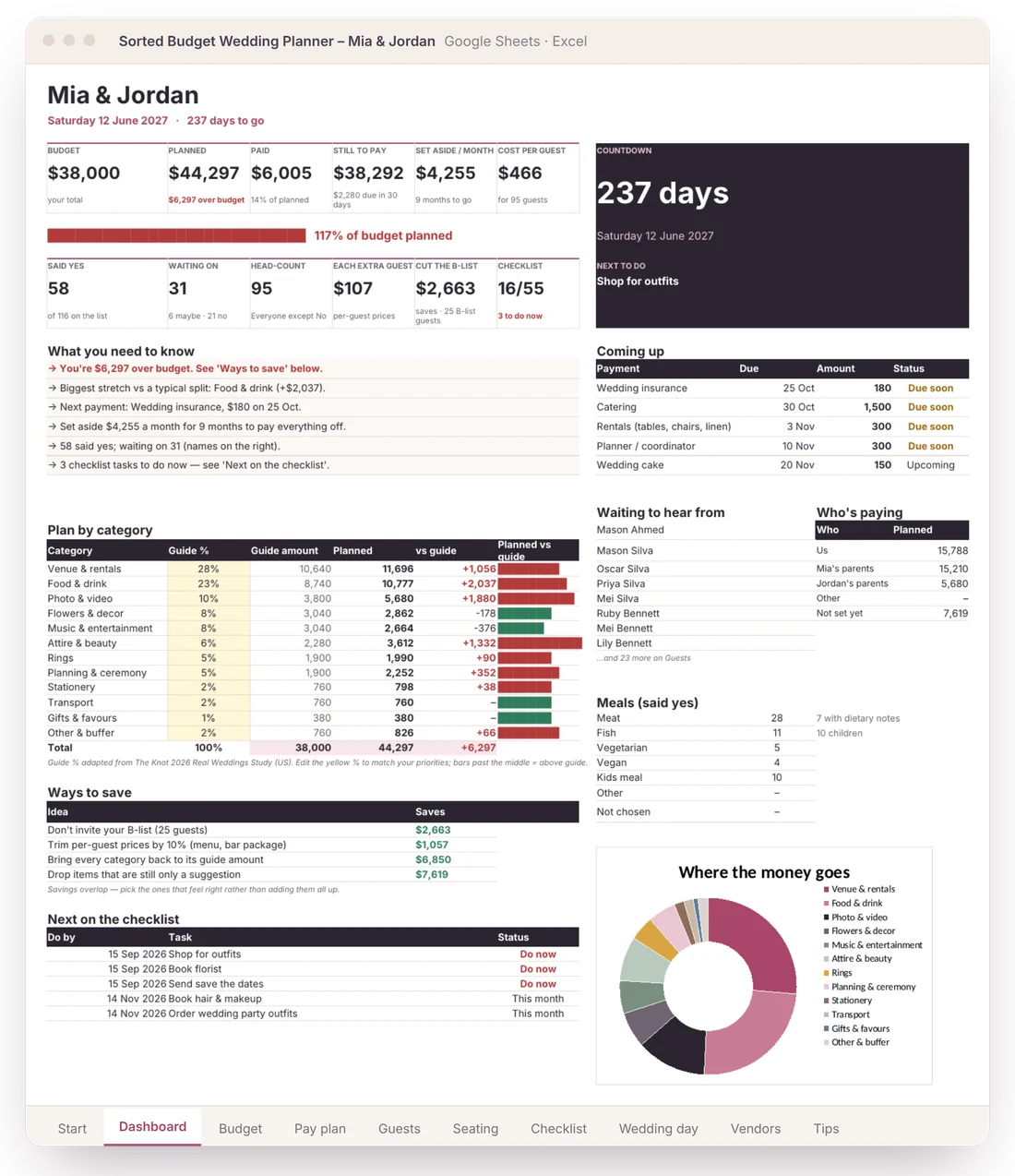
Budget vs planned, cost per guest, what’s due next, who hasn’t replied and who’s paying, plus plain-English notes like “You’re $6,297 over budget” and how to fix it.
You type: nothing · It does: your to-do list, in plain English
Ten tabs that talk to each other
Change one thing and everything that depends on it updates. That’s the whole point.
A full budget from 2 numbers
Type your total and guest count. Every line gets a suggested amount until you have a real quote.
Guests drive the costs
Per-guest items follow your live head-count. See cost per guest, what each extra guest adds and what cutting the B-list saves.
Pay plan & monthly set-aside
Every deposit and balance by month, soonest first, with “due soon” flags and how much to put away each month.
A dashboard that tells you things
Plain-English notes: over budget and by how much, your biggest stretch, next payment, who hasn’t replied, ways to save.
Who’s paying
You, each family or others: planned, paid and left for each, so nobody is guessing.
Seating chart that fills itself
Type a table number on the guest list. Tables, seats free and who’s still unseated update on their own.
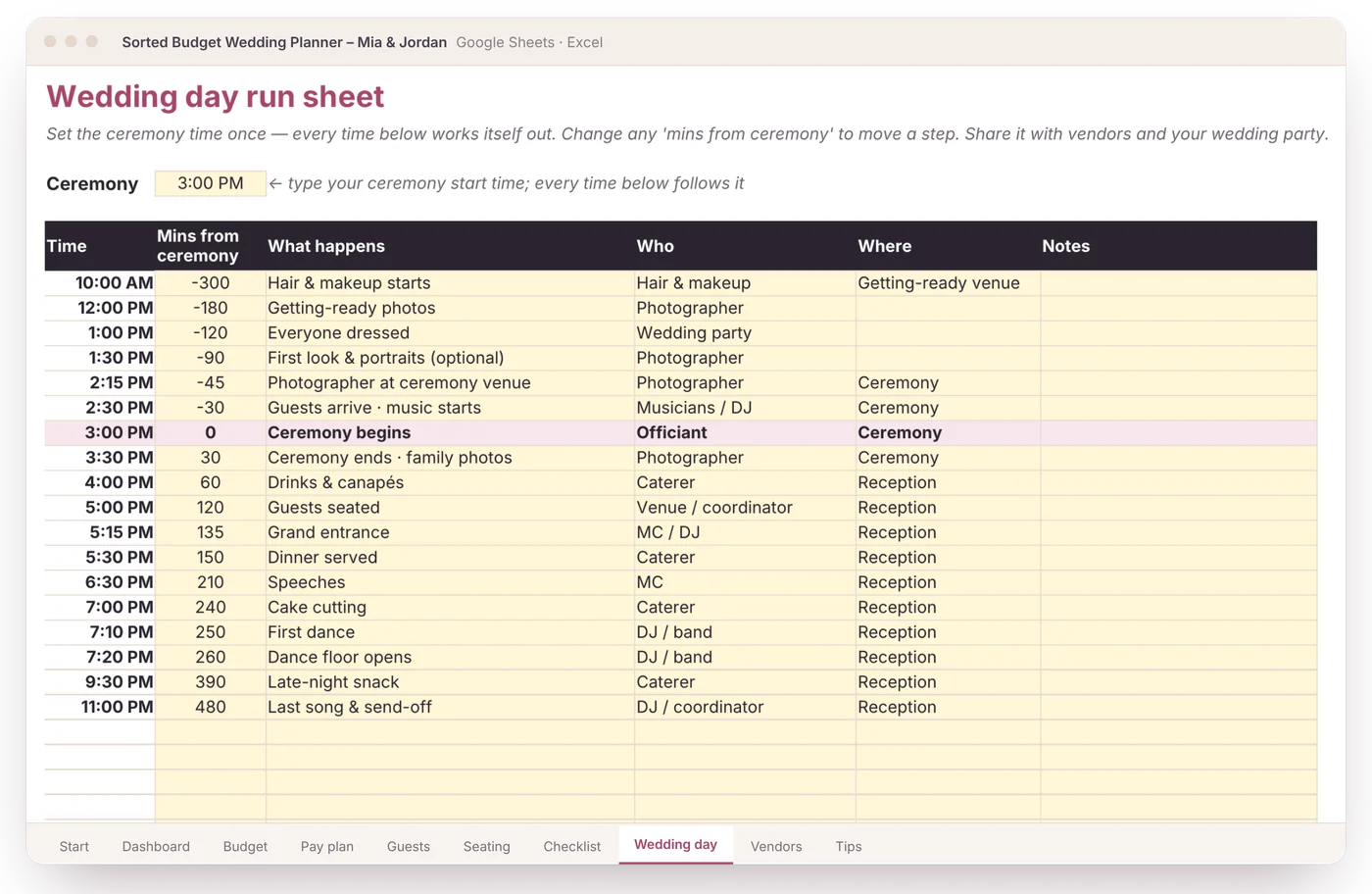
Wedding-day run sheet
Set the ceremony time once and every step’s time works itself out. Share it with vendors and your wedding party.
55-task dated checklist
Tasks date themselves back from your wedding day. “Do now” and “This month” flags keep you on track.
Meals, vendors, tips, any currency
Meal counts for the caterer, vendor quotes side by side, a tipping guide, and $, £, €, A$, C$ or your own symbol.
Real screens from the planner
Shown with a fictional couple. Your copy starts blank.
Why not a free template or an app?
| Sorted Budget Wedding | Typical free template | Wedding planning apps | |
|---|---|---|---|
| Full budget from just 2 numbers | Yes | No | Some |
| Guest list changes the budget | Yes, live | Usually separate | Varies |
| Deposits & balances in date order | Yes, with overdue flags | Rarely | Some, in-app |
| Monthly set-aside amount | Yes | Rarely | Rarely |
| Seating chart & day-of run sheet | Included, linked to guests | Separate templates | Some, in-app |
| Who’s paying, per family | Yes | Rarely | Rarely |
| Works in Google Sheets and Excel | Both included | Often one or the other | App only |
| Your data stays yours | Your own file | Yes | Account required |
| Vendor ads and upsells | None | None | Often |
| Price | US$24 once | Free | Free, with upsells |
A budget that knows a guest list is a cost
Sorted Budget makes spreadsheets that do the maths for you. Most wedding budget templates keep guests on one tab and costs on another, so every RSVP means re-doing sums by hand. This one connects them: the guest list, the budget, the payments and the checklist are one file that updates itself.
Made by Sorted Budget, an independent spreadsheet maker in Melbourne, Australia.
one-off · not a subscription
- Google Sheets copy + Excel file
- 10 tabs: Start, Dashboard, Budget, Pay plan, Guests, Seating, Checklist, Wedding day, Vendors, Tips
- Set up in about 5 minutes
- Any currency, any date format
- Free updates to this version
- 30-day fix-it-or-refund
Secure checkout by Stripe. Instant download. Any sales tax is shown at checkout.
Questions couples ask
Is this a Google Sheet or an Excel file?
Both are included. You get a Google Sheets version (it goes into your own Google Drive) and an Excel file for Excel on Windows or Mac. Plain formulas only: no macros, scripts or add-ons.
How long does it take to set up?
About 5 minutes to a first plan. Type your names, date, budget and guest count on the Start tab and every budget line gets a suggested amount. Add guests and real prices as you go.
We don’t have any quotes yet. Is it still useful?
Yes, that’s what the suggested amounts are for. Your total is split the way a typical wedding spends it (from The Knot’s 2026 study). Replace each one with a real price when you book; the Dashboard shows how you’re tracking.
How does the guest list change the budget?
Catering, drinks and favours are set to “per guest”, so they multiply by your head-count, which comes straight from the RSVP column. Change an RSVP and the costs, cost per guest and total update. Tag guests B-list to see what they cost.
How do we know how much to save each month?
Add deposits and balances with due dates on the Budget tab. The Pay plan lists what’s due each month and works out how much to set aside per month until the wedding.
Can it do our seating plan and wedding-day timeline?
Yes. Type a table number for each guest and the Seating tab fills itself. The Wedding day tab is a run sheet: set the ceremony time and every step’s time works itself out.
Can our parents see what they’re paying for?
Yes. Each item has a Who pays column (you, either family, other) and the Dashboard totals planned, paid and left for each. Share the Google Sheet with them if you like.
Does it work in my currency?
Yes. Pick $, £, €, A$, C$, NZ$ or type your own symbol on the Start tab. Dates follow your country’s format.
Do I need an account or an app?
No. It’s your own spreadsheet. Nothing to sign up for, no vendor emails, no app to install. You can view and update it in the Google Sheets app on your phone; set-up is easiest on a laptop.
Can I change the categories and items?
Yes. Rename items, add your own in the spare rows and edit the guide percentages. Formulas are protected with a warning so you don’t break them by accident.
What if something doesn’t work for us?
Tell us what went wrong within 30 days on the help page and we’ll fix it or refund you in full. One refund per customer. This doesn’t limit your consumer-law rights.
Is this financial advice?
No. It’s a planning tool. Always check the terms in your vendor contracts.